package dao;
import static com.smc.db.JdbcUtil.*;


import java.sql.*;

import org.springframework.stereotype.Repository;

import vo.User;

@Repository
public class UserDAO {
	Connection con;
	private static UserDAO uDAO;


	public void setConnection(Connection con) { this.con = con;}

	public static UserDAO getInstance() {
		if(uDAO==null) uDAO = new UserDAO();
		return uDAO;
	}

	public int sign_up(User user) {
		PreparedStatement pstmt = null;
		int insertCount = 0;
		String Sql = "";

		try {
			Sql = "INSERT INTO Users values(?,?,?)";
			pstmt = con.prepareStatement(Sql);
			pstmt.setString(1, user.getId());
			pstmt.setString(2,user.getPass());
			pstmt.setString(3, user.getName());
			insertCount = pstmt.executeUpdate();
		}catch(SQLIntegrityConstraintViolationException e){
			System.out.println("중복된 아이디가 있습니다");
			e.printStackTrace();
			return -1;
		}catch(SQLException e) {
			e.printStackTrace();
		}finally {close(pstmt);}

		return insertCount;
	}
	public boolean sign_in(User user){
		PreparedStatement pstmt = null;
		ResultSet rs = null;
		try {
			pstmt = con.prepareStatement("SELECT id,password FROM users where id = ?");
			pstmt.setString(1, user.getId());
			rs = pstmt.executeQuery();
			if(rs.next()) {
				if(rs.getString("password").equals(user.getPass())) {
					return true;
				}
				else {
					System.out.println("비밀번호가 일치하지 않습니다.");
					return false;
				}
			}
			else {System.out.println("등록된 아이디가 없습니다.");
				return false;

			}
		} catch(SQLException e) {
			e.printStackTrace();
		}finally {close(rs); close(pstmt);}

		return true;
	}

	public User getInformation(String id) {
		PreparedStatement pstmt = null;
		ResultSet rs = null;
		try {
			pstmt = con.prepareStatement("SELECT id,password,name FROM users where id = ?");
			pstmt.setString(1, id);
			rs = pstmt.executeQuery();
			if(rs.next()) {
				return new User(rs.getString("id"),rs.getString("password"),rs.getString("name"));
			}
			else {System.out.println("등록된 아이디가 없습니다.");
				return new User(rs.getString("0000"),rs.getString("0000"),rs.getString("0000"));
			}
		} catch(SQLException e) {
			e.printStackTrace();
		}finally {close(rs); close(pstmt);}

		return new User("0000","0000","0000");
	}
}
<UserDAO.java>
User 객체를 매개변수로 받는 sign_in 함수를 작성하고 전달받은 User객체가 DB 상에 존재하는지를 확인하고 결과를 Boolean 값으로 return 하도록 하였다.
package service;
import static com.smc.db.JdbcUtil.*;


import org.springframework.stereotype.Service;
import java.sql.Connection;
import vo.User;
import dao.UserDAO;

@Service
public class SignInService {
	public UserDAO uDAO;

	public int signin(User user) {
		uDAO = UserDAO.getInstance();
		Connection con = getConnection();
		uDAO.setConnection(con);
		boolean suc = uDAO.sign_in(user);
		int isSuccess = 0;
		if(suc){commit(con); isSuccess = 1;}
		else rollback(con);
		close(con);
		return isSuccess;
	}
}
<SignInService.java>
DAO 객체에 connection 객체를 할당하고 commit하는 역할을 수행하는 SignInService 클래스를 작성하였다.
package com.smc.test;
import javax.servlet.http.HttpServletRequest;


import org.springframework.stereotype.Controller;
import org.springframework.ui.Model;
import org.springframework.web.bind.annotation.RequestMapping;

@Controller
public class UserSignInController {
	@RequestMapping("/SignIn.chic")
	public String view(HttpServletRequest request ,Model model) {
		String result = "SignIn";
			return result;
	}
}
<UserSignInController.java>
<%@ page import = "vo.User" %>
<%@ page import = "service.SignInService" %>
<%@ page language="java" contentType="text/html; charset=UTF-8"
    pageEncoding="UTF-8"%>
<%@ page trimDirectiveWhitespaces="true" %>
<!DOCTYPE html>
<html>
<head>
<meta charset="UTF-8">
<title>로그인</title>
</head>
<body>
	<form class = "SignIn" action = "/test/SignIn.chic" method = "post">
	<h3>로그인</h3>
 아이디 : <input type = "text" name = "id" required = "required">
 비밀번호 : <input type = "text" name = "pass" required = "required">

  <button class = "btn" type = "submit">로그인</button>
  <%
	String id = request.getParameter("id");
 	String pass = request.getParameter("pass");
 	SignInService sis = new SignInService();
 	if(id!=null){
 	int s = sis.signin(new User(id,pass,"."));
 	if(s==1){
 		session.setAttribute("loggedID", id);
 		out.println("<script>");
 		out.println("alert('로그인이 완료되었습니다.')");
 		out.println("location.href = '/test'");
 		out.println("</script>");
 	}
 	else{
 		out.println("<script>");
 		out.println("alert('로그인 정보가 일치하지 않습니다.')");
 		out.println("location.href = 'SignIn.chic'");
 		out.println("</script>");
 	}
 	}
 	%>
 </form>
</body>
</html>
<Signin.jsp>
input으로 아이디와 비밀번호를 입력받고 해당 값을 받아서 name란이 없는 User 객체를 받아 SignInService 클래스의 Sign_in 함수를 통해 성공 여부를 전달받는 코드를 짰다.
그리고 로그인이 성공하면 session의 setAttribute함수를 통해 로그인된 id를 저장하여 로그인 인증에 사용할 수 있도록 하였다.
<%@ page language="java" contentType="text/html; charset=UTF-8" pageEncoding="UTF-8" %>
<%@ page trimDirectiveWhitespaces="true" %>
<html>
<head>
	<title>세상의 모든 치킨</title>
	<meta charset="utf-8" />
</head>
<body>
<%
String id = (String)session.getAttribute("loggedID");
if(id!=null){
%>
	<header>
			<img src = "resources/img/SMClogo.png" width = "50" height = "50">
			<a href = "/test"><img src = "resources/img/logo2.png" width = "140" height = "50"></a>
			<a href= "CList.chic"><img src = "resources/img/list.png" width = "120" height = "50"></a>
			<a href= "CInsert.chic"><img src = "resources/img/regist.png" width = "120" height = "50"></a>
			<div style = "width: 300px; height: 50px; float: right;" ><%=id%>님 환영합니다. <a href= "/test/UserPage.chic">MY PAGE</a><a href= "/test/logout.chic">로그아웃</a></div>
	</header>
<%
} else{
%>
	<header>
			<img src = "resources/img/SMClogo.png" width = "50" height = "50">
			<a href = "/test"><img src = "resources/img/logo2.png" width = "140" height = "50"></a>
			<a href= "CList.chic"><img src = "resources/img/list.png" width = "120" height = "50"></a>
			<a href= "CInsert.chic"><img src = "resources/img/regist.png" width = "120" height = "50"></a>
			<div style = "width: 120px; height: 50px; float: right;" ><a href= "SignUp.chic">회원가입</a></div>
			<div style = "width: 120px; height: 50px; float: right;" ><a href= "SignIn.chic">로그인</a></div>
	</header>
<%

}%>
</body>
</html>
<home.jsp>
메인화면에서 session의 getAttribute를 통해 아까 저장한 값을 가져오는데, 그 값이 null이냐 아니냐에 따라서 화면 출력을 다르게 설정하였다.



<%@ page  import = "vo.Chicken"%>
<%@ page  import = "java.util.ArrayList"%>
<%@ page language="java" contentType="text/html; charset=UTF-8"
    pageEncoding="UTF-8"%>
<%@ page trimDirectiveWhitespaces="true" %>
<!DOCTYPE html>
<html>
<head>
<meta charset="UTF-8">
<title>세상의 모든 치킨</title>
<%
	ArrayList<Chicken> clist =  (ArrayList<Chicken>)request.getAttribute("chic");


%>
</head>
<body>
<%
String id = (String)session.getAttribute("loggedID");
if(id==null){
		out.println("<script>");
		out.println("alert('로그인 후 이용 가능합니다.')");
		out.println("location.href = '/test'");
		out.println("</script>");
}%>
 <header>
			<img src = "resources/img/SMClogo.png" width = "50" height = "50">
			<a href = "/test"><img src = "resources/img/logo2.png" width = "140" height = "50"></a>
			<a href= "CList.chic"><img src = "resources/img/list.png" width = "120" height = "50"></a>
			<a href= "CInsert.chic"><img src = "resources/img/regist.png" width = "120" height = "50"></a>
			<div style = "width: 300px; height: 50px; float: right;" ><%=id%>님 환영합니다. <a href= "/test/logout.chic">로그아웃</a></div>
</header>


 <h3>치킨 목록 </h3>
 	<table style="1px solid black; width:30%; height:200px; margin : auto; text-align = center";>
 	<tr>
 		<td>이름</td>
 		<td>가격</td>

 	</tr>
 	<%
 		if(clist!=null){
 			for(int i=0; i<clist.size();i++){

 	%>
 	<form action = "/test/CReview.chic">
 	<tr>
 		<td><% String name = clist.get(i).getName(); out.println(name); %></td>
 		<td><%=clist.get(i).getPrice() %></td>
 		<td><button type = "submit" onclick = "location.href ='CReview.chic'" name = "name" value = "<%=name%>" formmethod = "get">리뷰 쓰기</button></td>
 	</tr>
 	</form>
 	<form class = "Rev-list" action = "/test/Rlist.chic" method = "get">

 	 <tr>
 		<td><input type = "hidden" name = "name" value ="<%=name %>" ></td>
 		<td><button class = "btn" type = "submit">리뷰 목록</button></td>
 	</tr>
 	</form>

 	<%
 		}
 	} else{
 	%>
 	 <tr><td colspan="2"> 등록된 치킨이 없습니다. </td></tr>
 	<%
 	}
 	%>


 	</table>

</body>
</html>
<CList.jsp>
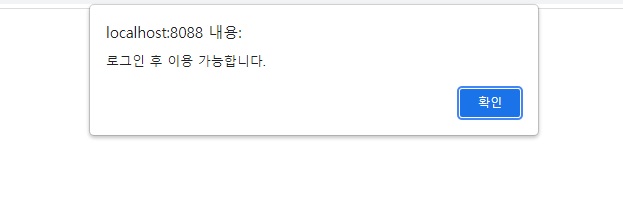
치킨 목록 및 치킨 등록 기능에 메인화면의 로그인 id를 받아오는데에 사용했던 getAttribute 함수를 이용하여 만약 로그인된 id가 없을 경우 로그인 후 이용이 가능하다는 alert를 출력하고 메인화면으로 이동하는 기능을 추가하여 접근 제한 기능을 만들었다.
'공부 > [Project] 치킨' 카테고리의 다른 글
| aws ubuntu 초기 설정(java, tomcat) (0) | 2022.01.09 |
|---|---|
| 회원가입 기능 (0) | 2022.01.06 |
| 작성된 리뷰 목록을 확인하는 기능 (0) | 2021.12.27 |
| 치킨에 대한 리뷰를 작성하는 기능 (0) | 2021.12.27 |
| 새로운 치킨을 등록하는 기능 (0) | 2021.12.23 |


